 Games Thirst – Amazing Life
When patches for PS4 is available, you know next-gen is upon us. PS4 update 1.50 is now a thing, get the notes inside.
System Update:dus01.ps4.update.playstation.net/update/ps4/image/2013_1112/sys_df008b5601f4a214a3cc65030a02ac4a/PS4UPDATE.PUP
Recovery File (My guess is this is the full OS for people installing a new HDD):http://dus01.ps4.update.playstation…./PS4UPDATE.PUP
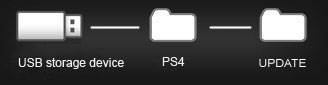
On the USB storage device, create folders for saving the update file.
- Using a computer, create a folder named “PS4″. Inside that folder, create another folder named “UPDATE”.
- Download the update file, and save it in the “UPDATE” folder you created in step 1.
- Save the file with the file name “PS4UPDATE.PUP”.
- Turn off the power of your PS4™ system completely.
- Check that the power indicator is not lit. If the power indicator is lit up in orange, touch the power button on the PS4™ system for at least 7 seconds (until the system beeps a second time).
- Connect the USB storage device that the update file is saved on to your PS4™ system, and then touch the power button for at least 7 seconds.
- The PS4™ system starts in safe mode
- Select [Update System Software].
- Follow the screens to complete the installation.
If your PS4™ system does not recognize the update file, check that the folder names and file name are correct. Enter the folder names and file name in single-byte characters using uppercase letters.